top of page

.png)
Agent Portal

Ready
Set
Go!
_edited.png)
1. Download our Pre-launch Checklist Guide.
2. Register for our biweekly Zoom sessions where we will assist you in completing the checklist: https://rem.ax/3JQgK9C
3. Get excited for the hard launch in September!
#1
#2
#3
#4
Frequently Asked Questions
Click on the links below to help you navigate to your questions of choice.
1. What is MAX/Tech Powered by kvCORE?
2. What are the advantages of using MAX/Tech?
3. How should I start preparing for MAX/Tech?
4. How will I access MAX/Tech?
5. What training will be provided?
6. How will I transfer/upload my database to MAX/Tech?
7. Who should I contact for questions and assistance?
1. What is MAX/Tech Powered by kvCORE?
MAX/Tech is RE/MAX's version of kvCORE (which is owned by Inside Real Estate). It is a system that provides you with a plethora of leads from remax.net websites and allows you to effectively manage your contacts, track activity, and set up email, text, and calling automation so you can focus your time on being in the field selling real estate. As a RE/MAX agent, you have access to more than just kvCORE, but additional add-on features that can excel your business (see photo below). The cost to have these products outside of being a RE/MAX agent is an estimated total of $7,787 annually (per 2 user licenses).
Click here to see other add-on features within the kvCORE Marketplace

2. What are the advantages of using MAX/Tech?
Plain and simple; if you're not currently using a Client Relationship Manager (CRM), then you're not reaching your past, current, and future clients like you could (and should) be. If you are currently using a CRM, but want to know how it may differ from MAX/Tech, continue reading.
CRM Key Highlight Features
-
Artificial Intelligence Lead Generation: kvCORE runs lead validation upon a new lead which enriches the lead's profile with their real name, home address, employment info, social profiles, and predictive activity. It will then come up with a predictive score for the lead that helps you prioritize your outreach so you're not wasting your time on cold leads.
-
Virtual Assistant: Once capturing a lead, kvCORE will call you on your SMART number in an attempt to get you connected to them in real-time. Most leads go dark after the first contact attempt. However, even if a lead doesn't pick up the phone on the first attempt, kvCORE's virtual assistant will start to automatically nurture the lead. They'll send out a text from you that not only sounds natural and inviting but includes additional properties that look aesthetically similar, meet their price point, bed/bath criteria, etc. kvCORE does this by running image recognition of every photo with the MLS.
-
SMART Number: kvCORE assigns you a local number that is connected to your database and contains a smart dialer. This number will be used when calling you up on new leads, as well as, allowing you to send and receive texts from your contacts. See everything about SMART numbers here.
-
SMART Campaigns: Full campaigns including text messages, emails, and tasks that have been tested by kvCORE to take on the most effective campaign for a given contact type. See everything about SMART campaigns here.
-
3 designed for anyone in contract status (1 for each deal type)
-
2 new lead campaigns (1 for buyer and 1 for seller)
-
1 new lead campaign for when using the open house app
-
3 active lead campaigns (1 for each deal type)
-
-
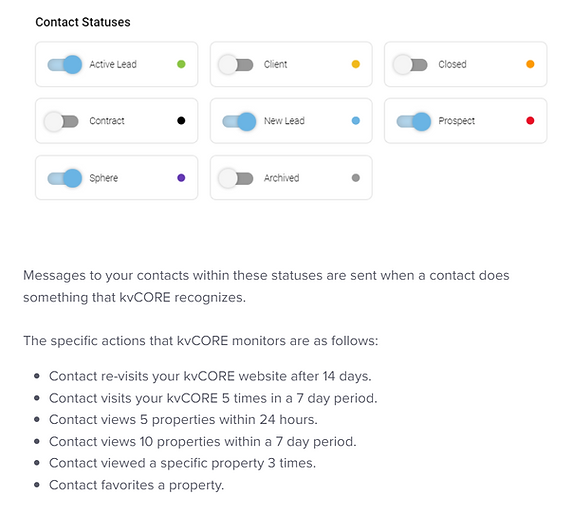
Behavioral Automation: Automatic communications sent to your contacts. By default, the system will automatically monitor your contacts following the below status. See everything about behavioral automation here.
3. How should I start preparing for MAX/Tech?
Start educating yourself! If you don't take the time to do your due diligence on the system, then you won't be properly prepared when you get access. Don't worry though; we'll provide you with a simple preparation plan below.
1. Download the Pre-Launch Checklist Guide.
2. Register & join our twice-a-week Zoom sessions: https://rem.ax/3JQgK9C.
4. How can I access MAX/Tech?
On a computer:
1. Go directly to https://maxtech.kvcore.com/. Be sure to bookmark this website as a favorite on your browser so you can easily access it at any time.
Via the app:

5. What training will be provided?
Our Support Team hosted pre-launch zoom sessions which started in July 2023, where they offered to assist agents in completing the Pre-Launch Checklist Guide. In September 2023, the Support Team traveled to each regional office location to give a training using the Hard-Launch Checklist Guide. Feel free to use these two guides as resources. Beyond this, kvCORE trainers provide frequent reoccurring webinars:
6. How will I transfer/upload my database to MAX/Tech?
When you initially log into your account, the system will walk you through setting everything up properly. It will also show you how to import your contacts into the CRM, however prior to doing so, we encourage you to watch the video below to avoid any potential frustration.
7. Who should I contact for questions and assistance?
Assisted Support:
-
Connect with a support member via the Live Chat bubble inside your account (Mon-Fri 10:00 am - 8:00 pm)
-
Book a 15-minute 1v1 call with:
-
Website design by a pro
-
Client examples
-
Contact info: justin@kvTemplates.com, (919) 264-8414
-
-
"Ask Me Anything" Zoom Call
On-Demand Support:
#5
#6
#7
bottom of page